
Practical purchasing guide
How to compare supplier quotes for an electronics BOM
Work through an electronics quote comparison with order quantities, MOQ, multiples, lead times, and total outlay. See why unit price alone is not enough.
Make the requirements comparable first
Before comparing prices, confirm that the offers refer to the same component, quantity basis, currency, and purchasing unit. A reel price and a per-piece price are not directly comparable. Neither are an exact MPN and an unreviewed alternative.
Start with confirmed demand from your BOM, including the reserve you intend to buy. Then inspect each offer’s minimum order quantity (MOQ), order multiple, applicable price tier, available quantity, and lead time. The useful question is how much you would need to spend to satisfy this requirement on the required schedule.
If the demand is still uncertain, work through the BOM preparation checklist first. A precise comparison against the wrong build quantity still produces the wrong plan.
Worked example: the lowest unit price costs more
You need 120 pieces, including your chosen reserve. Supplier A lists a lower unit price but requires a minimum purchase of 500 pieces. Supplier B sells in multiples of 50.
| Offer condition | Supplier A | Supplier B |
|---|---|---|
| Unit price | $0.09 | $0.13 |
| MOQ | 500 | 50 |
| Order multiple | 100 | 50 |
| Purchase quantity | 500 | 150 |
| Pieces above demand | 380 | 30 |
| Component outlay | $45.00 | $19.50 |
| Assumed time to receipt | 2 weeks | 6 weeks |
The purchase quantity must meet demand, meet MOQ, and comply with the order multiple. With simple fixed multiples, that means rounding the larger of demand and MOQ up to the next valid multiple:
Purchase quantity = round up to an order multiple (max[demand, MOQ])
- Supplier A: max(120, 500) = 500, already a multiple of 100. 500 × $0.09 = $45.00.
- Supplier B: max(120, 50) = 120, rounded up to 150. 150 × $0.13 = $19.50.
Supplier B requires $25.50 less component outlay for this requirement, even though its unit price is higher. Supplier A’s extra 380 pieces might have a use in another planned build, but that would be a separate demand assumption to make explicit.
Then apply the delivery requirement
Suppose the parts must be received within three weeks. In the example, Supplier B’s six-week receipt time does not meet that date. Supplier A fits the assumed schedule at a higher outlay. If both options are otherwise acceptable, the buyer must decide whether that extra cost is justified or whether another sourcing option is needed.
If the build can wait seven weeks, Supplier B becomes a feasible lower-outlay option. The best choice changes because the requirement changed, not because the arithmetic changed.
Review the whole purchase, not just one line
- Price tiers: use the price applicable to the actual purchase quantity. A price shown for 1,000 pieces may not apply to 150.
- Currency: use a consistent comparison basis and record the exchange-rate assumption. Keep the original quoted currency visible in your review.
- Additional charges: account for freight, handling, tax, or other applicable costs separately when they are known. An absent charge is not evidence that it is zero.
- Supplier scope: check whether combining lines with one supplier changes the purchasing effort or charges enough to affect the decision.
- Unquoted and partial lines: a low total is not a complete plan if some required parts are missing or only part of the quantity is covered.
- Alternatives: obtain the relevant technical approval before treating a replacement as interchangeable with the original MPN.
Make and record the comparison in BOM42
Confirm the requirement in QTY, then collect or import supplier offers in Quote. Review an uploaded quotation in its preview and apply it when the fields and rows are correct. The quote catalog brings offers together; the row inspector is where you select an offer for a BOM line.
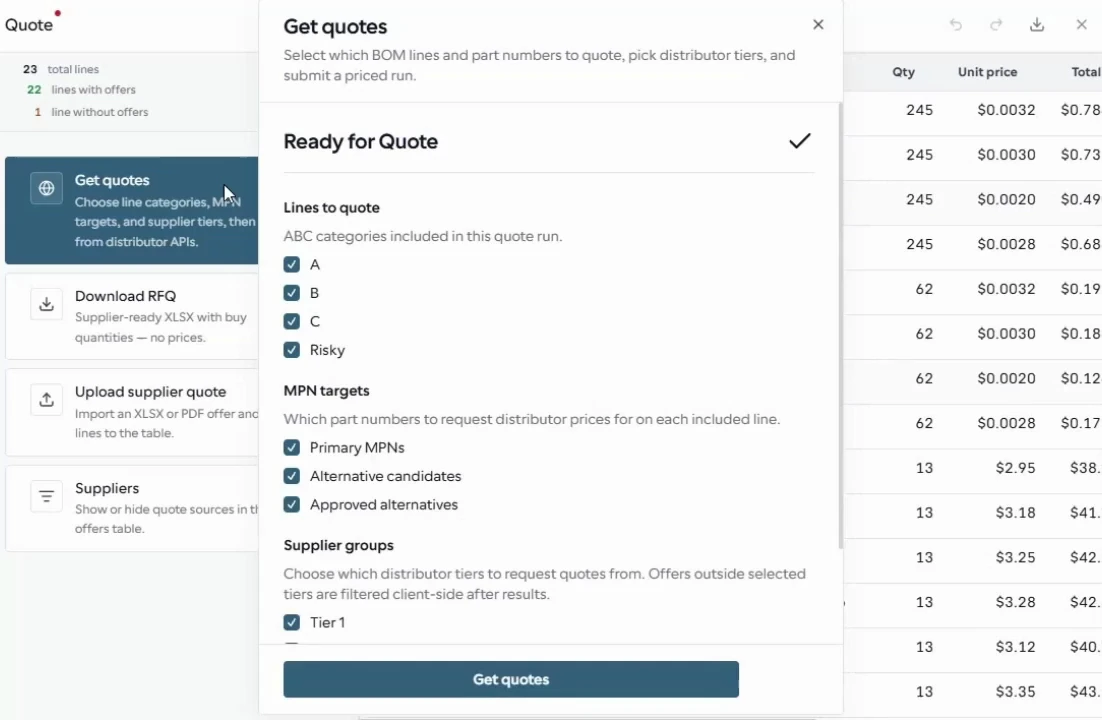
The open Get quotes dialog sets which lines, part-number targets, and supplier groups to include. Review returned offers and their purchasing conditions before choosing one in the row inspector.
From the BOM42 product walkthrough. Example data; displayed prices and availability are illustrative. Open the image to inspect it at full size.
Use Orders to review supplier scope and purchasing allocations and prepare the handoff. Keep any unresolved availability or delivery question visible to the person placing the order. BOM42 prepares the decision and its documents; you place the order through the supplier’s process.
For the complete sequence from import to delivery reconciliation, see how BOM42 works.
Put your BOM into a purchasing plan
Open BOM42 to start with your own file or choose a sample BOM. Sign in to use the purchasing workspace.
Open BOM42