
Practical purchasing guide
How to prepare an electronics BOM for quotation
Prepare part numbers, manufacturers, quantities, and references for BOM import. Use a practical checklist and sample workbook before requesting quotes.
Prepare one clear source table
A useful purchasing BOM answers two questions for each line: what is the intended component, and how many are needed? Keep the engineering source file, then prepare a table with one header row and a separate row for each component requirement. Leave introductory notes, subtotals, and build instructions outside the selected data rows.
BOM42 lets you map source columns during import. You do not need to rename every heading to match the tool, but check the mapping and the selected rows before applying the preview. A column named “Quantity” can mean very different things in two engineering exports.
The columns to bring, and why they matter
| Field | What to check |
|---|---|
| Manufacturer part number (MPN) | Use the full intended ordering code, including meaningful suffixes. Keep internal part numbers in their own field. |
| Quantity | Supply a positive number for an active line. Decide whether it is per board or the final quantity for the whole build. |
| Description | Give enough detail to review the requirement: component type, value, relevant ratings, and package. This is especially useful when an MPN is missing. |
| Manufacturer | Identify the intended maker so a similar code from another manufacturer is not mistaken for the same component. |
| Reference designators | Preserve identifiers such as R1, R2, and C7 so an engineer can trace a line back to the design. |
| Internal part number and notes | Keep your own identifiers and explain special requirements. Review do-not-populate status explicitly in the project. |
Set the quantity basis before you compare prices
Choose Qty per board × boards when each row describes one assembled board. Choose Final qty in each line when the rows already contain the totals you intend to source. In the second case, the board count must not multiply those totals again.
Example: 30 boards, four resistors per board
- Per-board source: enter 4 in the line and 30 as the board quantity. Base demand is 4 × 30 = 120 resistors.
- Final-quantity source: enter 120 in the line. That already represents the whole build.
- Reserve: if you decide to add 6 spare pieces, the purchasing demand becomes 126. Supplier pack sizes and minimums are a separate comparison.
This is an illustrative quantity example, without panelization or other planning overrides.
After importing, inspect QTY and confirm the “To buy” values. If the source already includes a reserve, record that assumption before adding another one. Review DNP (do not populate) and excluded lines so they do not accidentally become purchasing requirements.
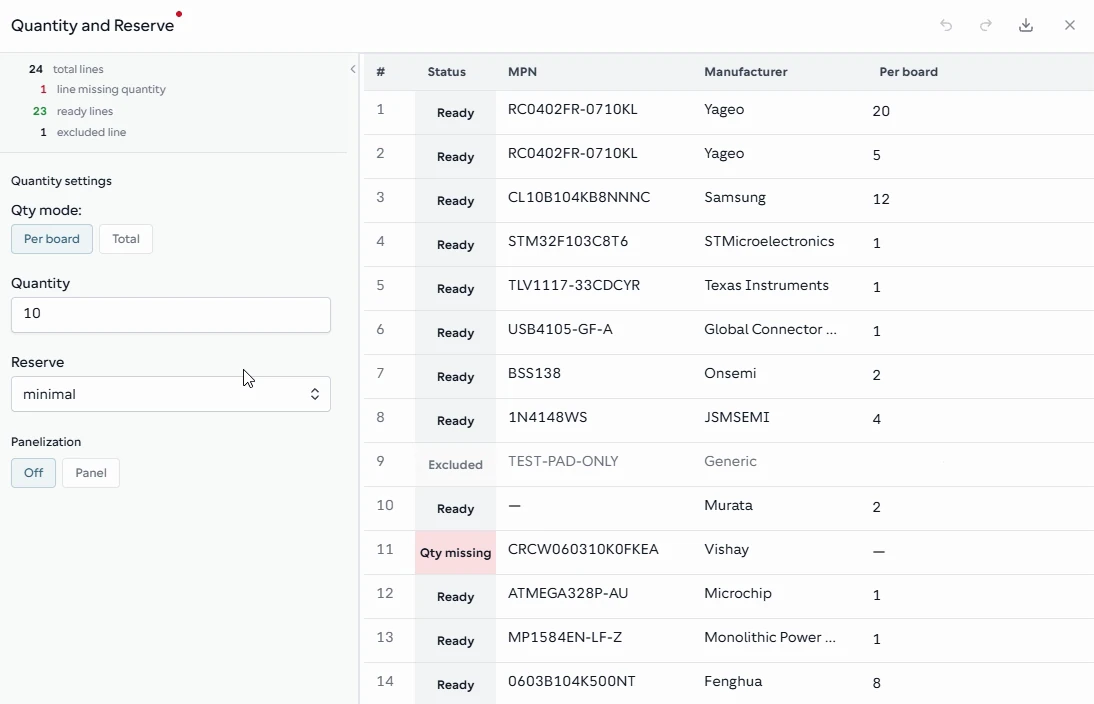
Review the quantity basis, reserve, and To buy values in QTY. Check a few representative lines against your build requirements before collecting offers.
From the BOM42 product walkthrough. Example data; displayed prices and availability are illustrative. Open the image to inspect it at full size.
Resolve identity and duplicate questions deliberately
Two rows with the same MPN may describe one combined requirement, or they may carry different engineering notes that you need to preserve. Review the rows in MPN before merging them. Check the resulting quantity and traceability rather than assuming that a repeated number is an error.
When an MPN is missing, use the description to investigate the intended component. A value such as “100 nF” alone does not capture voltage, tolerance, package, or other design constraints. Keep unresolved questions visible and confirm them with the engineering owner.
Use Issues to review findings against the confirmed project data. A clean-looking spreadsheet does not by itself establish that the parts are correct for the design.
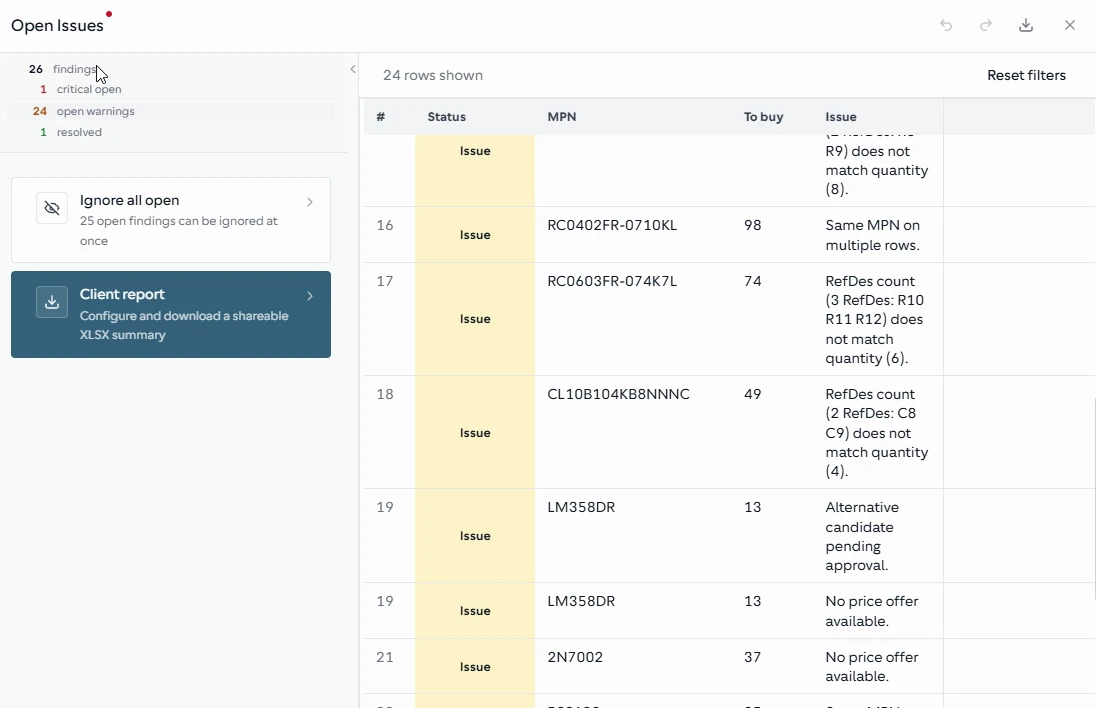
Issues groups the findings that still need attention, including part identity, references, alternatives, and missing offers.
From the BOM42 product walkthrough. Example data; displayed prices and availability are illustrative. Open the image to inspect it at full size.
A practical review checklist
- Confirm the revision. Make sure the BOM and the intended board build refer to the same design revision.
- Inspect the selected table. Check the first and last data rows, header mapping, and any rows containing notes or totals.
- Read a few MPNs carefully. Confirm suffixes and distinguish manufacturer codes from internal identifiers.
- Verify the quantity basis. Recalculate one common component and one high-value component by hand.
- Review missing values and duplicates. Resolve them or retain a clear question for the responsible person.
- Apply the reviewed preview. Then inspect MPN, QTY, and Issues before collecting offers.
Try the checks with a sample BOM
The downloadable practice spreadsheet uses columns for Line, Part Number, Mfr, Description, Qty, RefDes, and Notes. It deliberately includes duplicate part numbers and missing values so you can practice reviewing the import and resolving issues. It is sample data, not a verified production design or a ready-to-order parts list.
Download the practice BOM (.xlsx)Once the required quantities are clear, continue with comparing supplier quotations. That guide shows why minimum order quantities and pack multiples can outweigh a lower unit price.
Put your BOM into a purchasing plan
Open BOM42 to start with your own file or choose a sample BOM. Sign in to use the purchasing workspace.
Open BOM42