
Inside BOM42
Keep supplier choices connected to your BOM
Keep project suppliers connected to their offers and purchasing scope. Review source visibility, selected offers, and supplier-specific handoffs in BOM42.
Keep each supplier connected to the BOM they quoted
A supplier name in an email is only part of the purchasing record. You also need to know which parts they quoted, which offer you selected, and which quantities you plan to buy from them. BOM42 organizes suppliers within a BOM project so those details stay connected as the work moves from Quote to Orders and Deliveries.
This is useful when a project combines distributor search results with quotations from your existing contacts. Both can contribute offers to the same BOM without requiring you to rebuild a comparison sheet for each supplier.
Bring together web offers and supplier quotations
- Collected offers: Fast Quote results identify the suppliers that returned prices for your parts.
- Supplier files: name the supplier when importing a quotation, then review its columns and matched BOM lines.
- Project suppliers: select an existing supplier when working with another supplier document instead of creating a separate identity.
- Purchasing evidence: connect reviewed invoice and packing-list information to the relevant supplier and purchasing stage.
The Quote supplier list shows whether offers came from the web, a file, or both. You can choose which suppliers appear in the Quote table while keeping the purchasing decision with the individual BOM line.
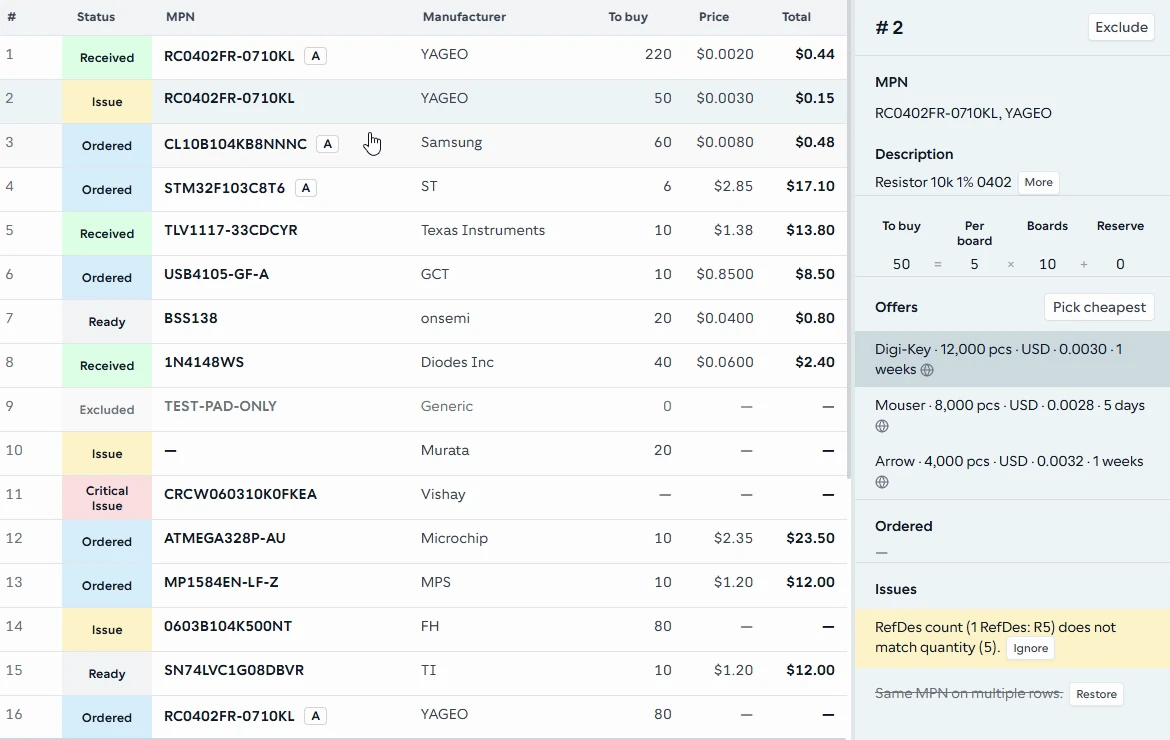
The selected BOM line brings its supplier offers into the inspector, alongside the line's quantities and issues.
From the BOM42 product walkthrough. Example data; displayed prices and availability are illustrative. Open the image to inspect it at full size.
From comparing suppliers to a purchasing handoff
- Collect comparable offers in Quote. Run a price search or upload supplier quotations. Review imported data before applying it to the project.
- Choose the offer for each line. Open the row inspector to review the part, supplier, price, and available offer terms. This is where the line's offer selection is edited.
- Set purchasing scope in Orders. Choose the suppliers to include and compare a lower-cost purchasing scenario with one that uses fewer suppliers. Review allocations before preparing a supplier purchase-order workbook.
- Reconcile by supplier in Deliveries. Review allocated lines, import packing-list evidence, and record received quantities against the purchasing plan.
Each stage answers a different question: who offered the part, which offer you chose, how you allocated the purchase, and what arrived. The resulting handoff retains that context.
Example: two distributors and an existing supplier
Suppose you are preparing a controller-board BOM. A distributor has the passives, another has the required microcontroller, and an existing supplier sends a spreadsheet quotation for the connectors. You import that spreadsheet under the supplier's name and compare the connector offers with the collected results.
After choosing offers, you review whether the lower component cost justifies using three suppliers. Orders lets you review the purchasing scenario and supplier allocations. You then download a PO workbook for each relevant supplier and send it through your normal purchasing process. When the connector shipment arrives, its packing list is evidence for reconciliation against those allocated lines.
Supplier management focused on the purchasing project
BOM42 manages the supplier context needed for BOM purchasing. It does not provide supplier onboarding, compliance scoring, a company-wide supplier CRM, payment processing, or supplier fulfillment. You continue to communicate with and place orders through your suppliers using your existing arrangements.
For the quotation exchange itself, see the RFQ preparation and supplier-response workflow. For evaluating the offers behind each supplier, explore electronic component sourcing and comparison.
Put your BOM into a purchasing plan
Open BOM42 to start with your own file or choose a sample BOM. Sign in to use the purchasing workspace.
Open BOM42