
Inside BOM42
Keep BOM preparation and purchasing work in one workspace
Move from spreadsheet import to confirmed purchasing decisions with focused stages, reviewable previews, saved projects, and portable project downloads.
Keep the BOM, offers, and purchasing decisions together
A purchasing project often begins with an engineering BOM, grows into several pricing spreadsheets, and ends with someone asking which file contains the final decision. BOM42 gives one BOM project a consistent working format, from the imported table through offer selection and purchasing handoff.
The workspace separates the questions you need to answer without separating the project into disconnected files. You can revisit part identity, quantities, unresolved issues, and supplier offers while keeping the current confirmed decisions available to the next stage.
Start with a file and review what it means
Import your BOM spreadsheet, choose the relevant sheet and header mapping, and review the preview. Map manufacturer part numbers, descriptions, quantities, and reference designators to the fields the purchasing workflow uses. Confirm whether quantities are per board or already the final demand for each line.
Applying the import creates the working BOM. The original parsed table values remain distinct from the project's confirmed values, so correcting a part number or quantity is a purchasing decision rather than an unnoticed edit to your source spreadsheet.
A clear place for each part of the work
- MPN: review part identity, match manufacturer part numbers, and handle duplicate part entries.
- QTY: set build quantities, review reserves, and confirm what you need to buy.
- Issues: review findings against the confirmed BOM and record how they are resolved.
- Quote and Alternatives: collect supplier offers, review candidate substitutes, and select the offer for each line in its inspector.
- Export: prepare a priced proposal from the selected offers and current quantities.
- Orders: review purchasing scenarios, supplier allocations, and purchase-order handoff documents.
- Deliveries: reconcile packing-list evidence and received quantities with the purchasing plan.
Stages summarize the same project, and you can move between them as needed. Each decision has a defined editing location. For example, Quote collects offers and the row inspector selects one; Orders owns the purchasing allocation.
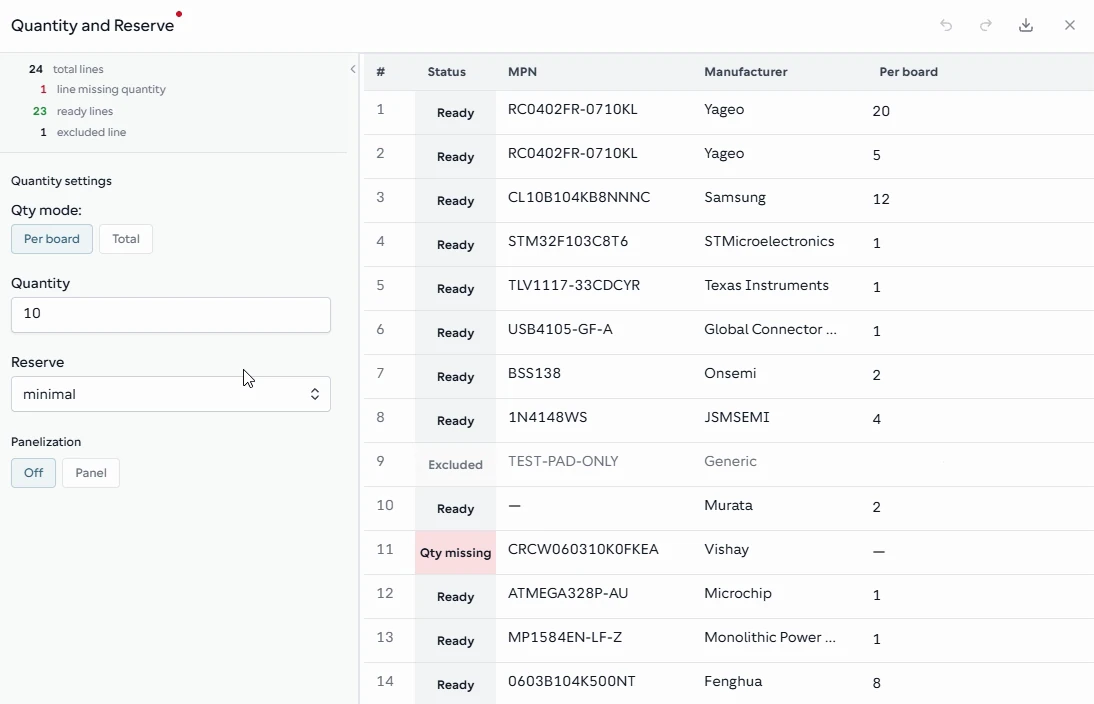
The quantity stage brings build quantity, per-board demand, and reserve settings together, with gaps shown against the BOM lines.
From the BOM42 product walkthrough. Example data; displayed prices and availability are illustrative. Open the image to inspect it at full size.
Review imports before they become project decisions
File selection and column mapping open a preview. They become part of the project when you apply the reviewed result. Closing an unfinished preview leaves confirmed work in place. This matters when you are experimenting with a supplier's spreadsheet or checking whether an imported column represents unit price or line total.
Completed edits update the confirmed project state. Browser resume can recover saved local work in the same account and workspace context; linked saved projects can also be reopened through My Projects. Follow any save-error or access message before switching work.
Save a project, download a portable copy, or hand over editing
A portable project download is a ZIP that can be opened in BOM42. It preserves parsed input tables and confirmed project decisions, including supplier information. Use it when you need a project copy that carries more context than a flat price spreadsheet.
The ZIP does not contain original source files, spreadsheet formulas, formatting, or extra sheets. Table downloads rebuild an XLSX from the stored values. Keep original supplier documents separately when your business needs those originals, and handle portable project files as purchasing data: they are not encrypted.
Organizations provide another way to work with a team. A saved project can belong to an organization, with one assigned editor and an explicit editing handoff. Other permitted members can review the BOM overview and exports. This gives the team a clear owner for changes during the purchasing process.
Example: prepare today, review with purchasing tomorrow
An engineer imports a controller BOM and checks the part numbers. The buyer confirms the build quantity, collects offers, and reviews a supplier quotation. At the end of the session, the confirmed project can be reopened or downloaded as a portable copy. A quotation mapping left in preview has not silently replaced the accepted offers.
The next review starts with the same confirmed demand and selected offers. The buyer can prepare a proposal, review supplier allocations, and download the purchasing handoff without reconstructing the project from email attachments.
Explore component-offer comparison or follow the supplier RFQ workflow to see how the workspace supports a specific purchasing task. For the full sequence, read how BOM42 works.
Put your BOM into a purchasing plan
Open BOM42 to start with your own file or choose a sample BOM. Sign in to use the purchasing workspace.
Open BOM42